Posts

Showing posts with the label ransomware virus removal tool

Anonymous Ransomware haunts China – Large Spread Infections!

Image
China deemed as a prodigy of technological outbreaks encountered unprecedented number of major cyber threats in last few years. Since the extensive destructive days of  WannaCry  and  NotPeyta  last year, ransomware attacks appeared to have dwindled heaving a sigh of relief among security researchers. A recent discovery of this distinctive cyber attack targeting China got the cyber security back to work. Unlike almost every ransomware malware that seek for ransom payments in Bitcoin, this ransomware virus demands for ransom through one of the country’s most popular payment methods.   WeChat Pay , one of  China’s most commonly used digital wallets , owned by Chinese tech giant  Tencent , was used by attacker to receive payments.   Threat Behavior This anonymous ransomware after infiltrating the system encrypts user’s files using a less secure  XOR cipher . However, the ransom note claims to have used a more sophisticated  DES encr...

How to Remove Ransomnix Ransomware from the computer system?

Image
What is Ransomnix Ransomware? Ransomnix is a file encryption virus categorized as a  Ransomware . This harmful piece of code infiltrates user’s system covertly and encrypts the websites & related files on the machine with a powerful encryption cipher. Ransomnix Ransomware uses  RSA-2048 encryption algorithm  to encrypt the user’s website files with a  .Crypt extension. Once the files get encrypted, the user cannot open or edit these files. It affects servers and internet sites! After encrypting the files on the user’s system the Ransomnix Ransomware displays a ransom note to the user demanding Ransom in crypto currency such as Bitcoin, Litecoin, Monero etc. Ransomnix Ransomware uses various methods to enter a user’s system to lock the files with its own file extension. These methods include: Third Party software bundling  – Third party software often have additional programs within the setup wizard. The software bundled within these third party...

Shipping Company COSCO hit by ransomware attack at its American Network

Image
COSCO Shipping Company’s communication networks taken Offline Shipping Company  COSCO was hit by a ransomware infection  that left its  American networks crippled . The company had to take its other networks temporarily offline as a precautionary measure The company issued an official press release that stated that its local email and telephone networks were unable to work properly at the time due to local American network breakdown. It was not clear as to what the issue was that led to an operations shutdown at the American network of the COSCO Shipping network. Some maritime news websites contained information that the system breakdown or the operations shutdown was implemented due to a Ransomware infection that had infected some of the systems. The  source of this news was from the internal emails of COSCO  as seen by some maritime news sites. COSCO Shipping Network is taking Contingency Steps The  press release of 25 July 2018 from COSCO S...

Guidelines to remove irestorel@hotmail

Image
irestorel@hotmail.com is a nasty computer ransomware designed to exploit important user files by encrypting them. The pernicious malware is able to encrypt all kind of system files using a very powerful APS cryptographic algorithm. The encrypted files feature a strange file extension. The files that it can lock include, audios, videos, images, MS Office files, pdf, xml, html, text and many more making them completely inaccessible to the user. Hence users are deprived from accessing any data. The sole purpose behind this malicious act is to earn ransom by selling the decryption key to the infected files. The user is notified about the encryption through a ransom note that appears on the system screen stating that a unique decryption key is required to restore files. The users are entitled to pay a ransom to get the decryption key. However, the users are advised not to rely on any solution provided by the hackers in any case because the victims are often ignored, once the ransom...

What is SamSam Ransomware?

Image
SamSam Ransomware is a malware program that belongs to the category of crypto virology. This ransomware infection uses RSA-2048 asymmetric encryption algorithm to encrypt the data files. Due to this encryption algorithm two keys (public and private) are generated during the encryption process. The Samsam ransomware attack is prone to infringe your computer’s security and expose it to severe threats. Once the user data is encrypted, this ransomware leaves a ransom note on the computer. Threat Summary Name: SamSam Ransomware Targeted Operating System: Windows XP, Windows 7, Windows Vista, Windows 8/10 Category: Ransomware Symptoms: Encrypted system data, slow system performance and adds its own extension to the data files Why is SamSam Ransomware dangerous for your computer system? The SamSam Ransomware is distributed through various malware distribution strategies. It is a severe threat to your computer’s security because it can make your personal da...

How to Remove PUBG Ransomware?

Image
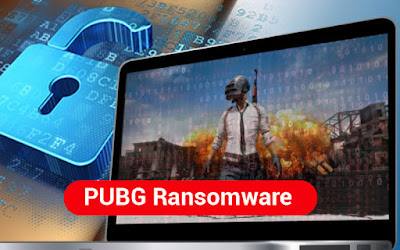
The PUBG is nasty ransomware which has been newly discovered by the MalwareHunterTeam and it encrypts the user’s data thereby appending “.PUBG” extension to the files and folders on the desktop of the victim. This ransomware is not that hazardous for the decryption is really simple and quick. This is a kind of joke ransomware for it does not demand a ransom from the victim and the behavior is quite unusual from the rest of the ransomware. Threat Summary • Name – PUBG Ransomware • Targeted Operating System– Windows XP, Windows Vista, Windows 7 and Windows 8/10 • Category – Ransomware, Cryptovirus • Symptoms –Encrypts sensitive data and user’s files, appends .PUBG extension to the files that have been encrypted by it and demands the victim to play a game in order to decrypt the files. Why should you worry about PUBG Ransomware? PUBG Cryptovirus will encrypt your data but is suspected to be a kind of prank program for it demands the victim to play a game in order to decry...

How to remove ScorpionLocker Ransomware and restore your data files?

Image
What is ScorpionLocker Ransomware? The ScorpionLocker Ransomware is a malicious ransomware infection which is prone to infringe your system security and encrypt all your important data files. This ransomware virus is also associated with the H34rtBl33d ransomware virus. After encrypting all your important data, this ransomware leaves a ransom note which asks the user to pay a ransom of one bit coin. Threat Summary • Name:ScorpionLockerRansomware • Targeted Operating System: Windows XP, Windows 7, Windows Vista, Windows 8/10 • Category: Ransomware • Symptoms: Encrypts system files andslow system performance Why is ScorpionLocker Ransomware dangerous for your computer system? The ScorpionLocker Ransomware is a malware program which can gain an unauthorized access to the user’s system through various malicious tactics used by cyber crooks. This ransomware is a major threat for your computer system because it is capable to lock all your data files and will make it impossible for yo...

How to Remove Server Ransomware and Restore Your Data Files?

Image
What is Server Ransomware? The server ransomware is a crypto ransomware which encrypts the personal documents found on the user’s system and asks the user to pay a hefty amount of ransom ranging from .5 to 1 Bitcoin. This server ransomware infection leaves a ransom note on the system once the user data is encrypted. Here is how it looks like Threat Summary   Name: Sever RansomwareTargeted Operating System: Windows XP, Windows 7, Windows vista, Windows 8/10 Category: Ransomware Symptoms: Encrypts all the user files, leaves a ransom note on the system and adds a .server extension to the files How did Server Ransomware got installed on your PC? The cybercriminals use various strategies for malware distribution which include – 1. Software Bundling: Software bundling is the process in which a malicious program is distributed with other free software, to get an unnoticed entry into your computer system. When a user installs...

How to remove Searchvaults.com Browser Hijacker from your Computer?

Image
Instead of your homepage, does the page named Searchvaults.com get automatically opened, when you launch your Internet Browser or the new tab page of your browser has been set to Searchvaults.com? Then, most probably this browser hijacker has got installed on your system. The homepage and search engine of your web browser will be changed to http://www.searchvaults.com/. What is Searchvaults.com redirect? Searchvaults.com is a browser hijacker that gets installed in your PC and appears to be a legitimate search engine. Basically, this browser hijacker gets installed on the user’s system along with free software and program that are downloaded off the internet. It not just modifies the settings of your web browser but also gathers information pertaining to your Internet browsing activity. Threat Summary • Name – Searchvaults.com • Browsers Affected – Google Chrome, Mozilla Firefox, Internet Explorer, Microsoft Edge • Category – Browser Hijacker, Adware • Symptoms – Pop-up ads a...

How To Remove DriedSister Ransomware From Your Computer System

Image
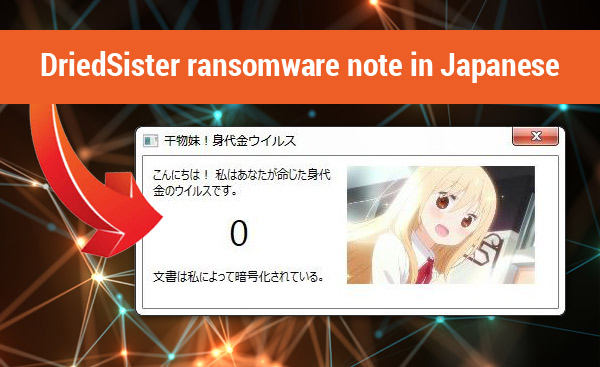
What is DriedSister Ransomware? The DriedSister Ransomware is a Japanese file encrypting ransomware which was created by malicious developers in order to generate revenue. This ransomware infects and encrypts all your important files by renaming the program file with a strange file extension that is .干物妹. So if your document file name was Word.doc, then it will change to Word.doc.干物妹after ransomware encryption. This nasty infection once installed, will not allow you to access your important data. There is no known ransomware removal tool available till date that has a sure shot solution to this infection. The DriedSister ransomware in Japanese is spelled as “下 物 妹” which in English Is pronounced as “Irisimoimoto.”     Threat Summary The DriedSister ransomware is a malicious program which contaminates the user’s system and encrypts the data in order to generate revenue for its developers. • Name – DriedSister Ransomware • Targeted Operating System – Win...